
Delish
Hearst Communications, Inc.Food & Drink
4.6227.00 Reviews
- Version
- 2.5.0
- Installs
- 100.00K
- Age Rating
- Everyone
Screenshots

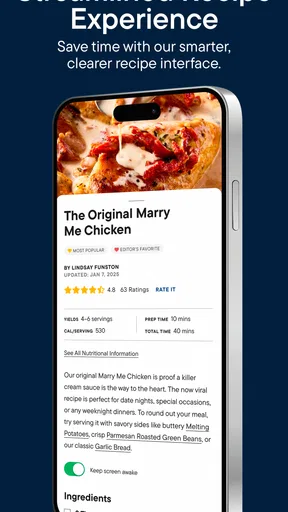
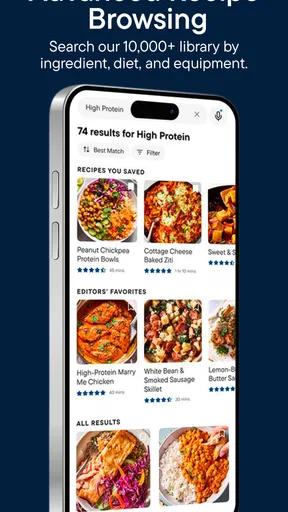
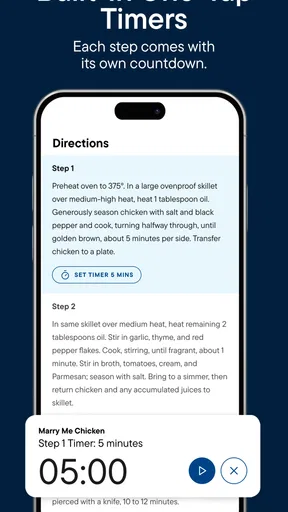
Our Review of Delish
 Analysis by Appyee
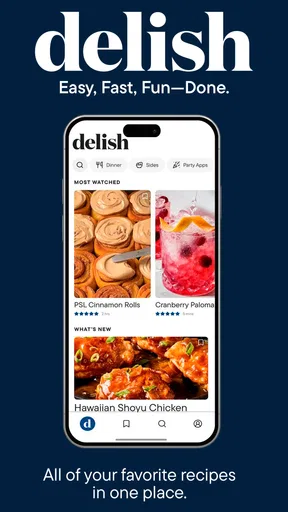
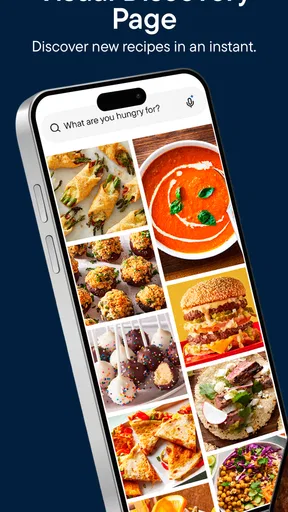
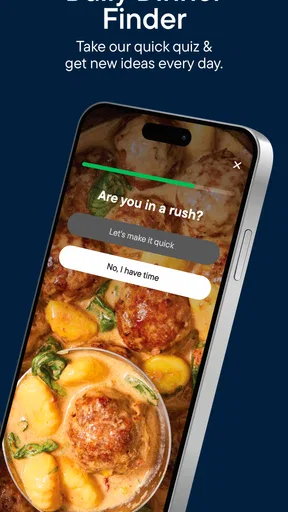
I opened Delish expecting a simple way to find something appealing for dinner, and that is still the clearest way to understand it. This is a free Food & Drink app from Hearst Communications, Inc., built around daily recipe ideas and cooking inspiration rather than pantry accounting, meal-plan administration, or a full grocery workflow. I found it most useful when I knew I wanted to cook but had no clear answer to the question, “What should I make?”
The app is aimed at Everyone, runs on Android 7.0 and later, and has reached over 100 thousand installs. Its current version is 2.2.5. Those details make it accessible to people using older Android phones, although the experience still depends heavily on how much you enjoy browsing. Delish is less like a strict kitchen assistant and more like opening a well-organized stream of possibilities when your usual dinner rotation has become dull.
My overall reaction is mixed but fairly clear: Delish works best as an idea generator, not as a complete cooking command center. If you want inspiration, recipe discovery, and a reason to try something outside your normal habits, it has a sensible role. If you want highly structured planning, precise dietary control, or a single place to manage ingredients from discovery through shopping, you may prefer a more specialized alternative.
How I used Delish for ordinary cooking decisions
I use Delish most effectively when I treat browsing as the first step in a decision, not the whole decision. This section looks at how I turn a promising idea into a meal that fits the evening, including the small checks that keep inspiration from becoming an impractical detour. That everyday approach also makes it easier to decide which browsing habits are worth keeping.
Starting with browsing instead of a rigid plan
The most natural workflow is to open the app when you have a vague intention rather than a finished recipe in mind. I might be thinking about a quick weekday meal, a comforting dish, or something that uses an ingredient already sitting in the refrigerator. In that situation, the daily recipe focus gives me a starting point without forcing me to build a meal plan before I have any enthusiasm for one.
That distinction matters. Many cooking apps are designed around a task such as entering ingredients, selecting dietary rules, or generating a schedule. Delish feels more editorial. I browse first, notice a dish that looks manageable, and then decide whether it fits my evening. This is a pleasant workflow when motivation is the main problem.
I also found that browsing works better when I give myself a small decision limit. Instead of scrolling indefinitely, I look for two or three realistic candidates and compare them by preparation effort, ingredients I already have, and whether the dish suits the people eating. Without that self-imposed limit, recipe inspiration can easily become procrastination.
Turning an appealing recipe into a practical choice
A photograph or appealing title is enough to make me open a recipe, but it is not enough to make me cook it. My useful habit is to inspect the ingredient list and the method before committing. I look for ingredients that require a special shopping trip, steps that need more time than I have, and techniques that could become awkward in a small kitchen.
This is one of the app’s less obvious trade-offs. An inspiration-first design encourages discovery, but it can also make an ambitious dish look easier than it is during a busy evening. I therefore treat the first screen as an invitation, not a promise. The recipe becomes a serious option only after I have checked its practical demands.
For a realistic weeknight example, I might open Delish on the way home, save the first promising idea mentally, and compare it with what is already available at home. If the dish needs several uncommon items, I move on rather than trying to force it. If most of the ingredients are familiar and the method fits my time, the app has done its job: it has removed the blank-page problem.
Where it fits beside familiar alternatives
Compared with a general web search, Delish gives the discovery process a more focused food context. I do not have to sort through unrelated pages before finding something that looks like a recipe idea. Compared with a grocery-list app, however, it is not the same kind of tool. A list app is better once I already know what I am cooking and need reliable organization.
It also differs from meal-planning services that begin with a calendar, servings, or nutritional preferences. Those services are usually stronger for repeatable weekly routines. Delish is more enjoyable when I want variety and do not want to make the whole week’s decisions in advance. I would use the two types of app differently rather than expecting one to replace the other.
Settings and habits that make browsing more useful
A little preparation can make recipe discovery feel more focused without turning it into a rigid routine. I’ll cover the checks and personal habits that help me avoid unnecessary interruptions, spending, and indecision while keeping the app useful for spontaneous cooking. From there, I’ll look at shortcuts that suit people who already know how they like to choose a meal.
Check the basics before building a routine
Because Delish is free to install, it is easy to try without making a large commitment. I would still spend a few minutes checking the app’s available settings and account-related choices before settling into daily use. In particular, I would look at how notifications are handled, whether the app remembers preferences, and how any optional paid elements are presented during normal browsing.
I am careful here because inspiration apps can become noisy if alerts arrive at the wrong time. A daily suggestion can be welcome around lunch or late afternoon, but the same interruption may be irritating during work or family time. I prefer to keep only the reminders that genuinely help me cook and silence anything that turns browsing into pressure.
The app includes in-app purchases priced from $4.99 to $34.99 per item. That does not change the basic appeal of trying the free app, but it does make it worth paying attention to what is optional before spending money. I would not purchase anything simply because a recipe looks attractive. I would first use the free experience long enough to decide whether the extra value matches my cooking habits.
Use the phone as a prompt, not as your entire kitchen system
One practical limitation is that recipe discovery and kitchen execution are different activities. When I am cooking, I do not want to keep stopping to browse. My preferred routine is to choose the recipe before I begin, read through the complete method once, and then place the phone where I can glance at it without handling it constantly.
This small preparation step prevents a common mistake: discovering a recipe while already halfway through another plan. I also check whether the ingredients are listed in an order that makes sense for my workflow. If I need to chop everything first, I do that before heating the pan. If a sauce can be mixed while another component cooks, I organize those actions in advance rather than following the screen mechanically.
For accessibility and comfort, the minimum operating-system requirement is Android 7.0 or later. That is helpful for people who keep an older device, but an older phone may still be less comfortable for kitchen use if the display is small or the battery is weak. The app’s compatibility makes installation possible; it does not automatically make an aging handset ideal for following recipes.
Build a personal filter even when the app does not do it for you
My strongest recommendation is to create a mental filter based on three questions: Do I recognize most of the ingredients? Can I complete the dish with the equipment I own? Will the people eating it actually want it? This sounds simple, but it makes browsing much more efficient and avoids collecting attractive ideas that never become meals.
I also separate recipes into “cook soon” and “interesting later” in my own notes or routine, rather than assuming that every appealing discovery deserves immediate action. That prevents the app from turning into an endless collection of intentions. The point is not to save everything; it is to turn a small number of discoveries into actual dinners.
Faster patterns for experienced users
Once I have a reliable way to screen ideas, I can browse with less hesitation and spend more attention on whether a recipe fits the occasion. This section focuses on practical ways to narrow choices and keep discovery separate from shopping logistics. Those shortcuts help, but regular use also makes the app’s boundaries easier to recognize.
Use a two-pass decision process
When I want speed, I use two passes. The first pass is visual and instinctive: I scan for dishes that match my mood. The second pass is practical: I reject anything that conflicts with my time, ingredients, equipment, or household preferences. Separating those decisions is faster than trying to judge every recipe perfectly while browsing.
This approach also preserves the enjoyable part of Delish. If I begin with practical restrictions only, I may never discover anything new. If I browse without restrictions, I may choose something unrealistic. The two-pass method lets the app provide creativity while I provide the final judgment.
Match discovery to the moment of the day
Delish is more useful when I browse at a predictable decision point. Looking in the morning can help with planning and shopping, while opening it just before dinner is better for choosing among ingredients already available. I would not use the same browsing style at both times. Earlier browsing allows more ambition; last-minute browsing should favor familiar ingredients and short preparation.
This timing habit is especially helpful for people who feel overwhelmed by too many choices. I do not need to explore the entire catalog. I only need a few candidates appropriate to the moment. The app becomes a quick source of direction instead of another feed competing for attention.
Adapt recipes instead of treating them as fixed contracts
One of the practical strengths of recipe inspiration is that it can start an idea without dictating every detail. I often use a recipe as a structure and adjust it around what I have. A missing herb may not matter; a missing main ingredient may change the dish completely. The skill is knowing which substitutions preserve the character of the meal and which ones create an unrelated result.
I would still read the method carefully before changing important steps. Baking, food safety, and cooking times can be less forgiving than a casual substitution suggests. For ordinary stovetop meals, however, Delish can be a useful launch point for flexible cooking rather than a demand to shop for every listed item.
Keep discovery separate from grocery management
Another useful workflow is to choose the recipe first and create a shopping list second. I do not mix several possible recipes into one list while still deciding. That leads to duplicate ingredients, unnecessary purchases, and a refrigerator full of plans. Once I commit to one dish, I write down only what is needed and check what I already own.
This is where a dedicated grocery or meal-planning app may be better. Delish can inspire the meal, but a specialist tool is usually more appropriate for quantities, recurring staples, household sharing, and weekly organization. I see that as a boundary rather than a failure: the app has a clear role, and the role is discovery.
Limits that become clearer with regular use
An app can be useful for one part of cooking without being the right tool for every part of it. Here I consider the trade-offs that stand out after repeated browsing, especially when inspiration needs to become a dependable plan. That perspective leads to a practical verdict on who is likely to enjoy Delish and who may be better served by a more specialized option.
The rating suggests that expectations should stay realistic
Delish currently holds a 2.4 average from around 255 ratings, with roughly 183 written reviews. I would not treat that number as a complete verdict on every recipe or every phone, but it is a useful signal to approach the app with measured expectations. Before relying on it as my only cooking resource, I would test how smoothly it behaves on my device and whether its browsing style suits me.
A low average can reflect different frustrations, including performance, navigation, content expectations, or differences between what users want and what the app is designed to do. My own judgment is that the app makes most sense when I value inspiration enough to tolerate some browsing friction. Someone seeking a precise utility may be less forgiving.
It is not the best choice for strict planning or specialized diets
I would skip Delish as my primary tool if my cooking depends on exact nutritional targets, medically necessary restrictions, carefully calculated portions, or a tightly scheduled weekly plan. In those situations, a purpose-built service with structured filters and planning controls is likely to save more time and reduce uncertainty.
I would also hesitate to rely on it alone for feeding a large household with a fixed budget. Inspiration can increase variety, but variety can also increase shopping complexity. For that use case, I would rather plan a small group of repeatable meals and use Delish occasionally to break the routine.
Free access does not mean every experience is frictionless
The free price makes experimentation easy, but the presence of paid items means I would watch for moments when the app’s full value may depend on optional purchases. I prefer to understand what I am receiving before paying, particularly in an app whose main benefit is ongoing inspiration rather than a one-time utility.
There is also a personal cost to endless browsing. If I open the app whenever I feel indecisive, I can spend more time looking for the perfect recipe than cooking a good one. My solution is to set a stopping rule: choose a realistic option after a short browse, or make a familiar meal and try again another day. That habit improves the experience more than simply installing another cooking tool.
My verdict after fitting it into a real cooking routine
Delish is worth trying if your main obstacle is deciding what sounds good. I would recommend it to a casual home cook who enjoys discovering dishes, wants a break from repeated meals, and is comfortable making the final practical checks independently. Its daily inspiration focus gives it a friendly purpose, and the free entry point lowers the risk of seeing whether that purpose matches your habits.
I would not recommend it as a replacement for a grocery manager, a detailed meal planner, or a specialist nutrition app. Those tools solve different problems more directly. Delish can help me cross the first bridge from “I should cook something” to “This is what I want to make,” but I still need my own shopping routine, judgment, and kitchen organization to finish the journey.
The best results come from combining the app with repeatable habits: browse at a sensible time, shortlist rather than endlessly scroll, inspect the full recipe before shopping, and keep optional purchases separate from the free discovery experience. Those steps turn a stream of attractive ideas into decisions I can actually carry out.
My final opinion is positive with clear limits. The app’s 2.4 average means I would test it rather than assume it will suit everyone, and I would keep expectations focused on inspiration. For me, that is enough to give Delish a place in the cooking routine, especially on evenings when the refrigerator is familiar but my imagination has run out. If you want a spark rather than a complete kitchen management system, it is a reasonable app to explore.
Privacy and Permissions
See what permissions an app requests and how it handles your data.
- Photos/Media/Files
- read the contents of your USB storage, modify or delete the contents of your USB storage
- Storage
- read the contents of your USB storage, modify or delete the contents of your USB storage
- Microphone
- record audio
- Wi-Fi connection information
- view Wi-Fi connections
- Other
- view network connections, disable your screen lock, full network access, change your audio settings, run at startup, draw over other apps, control vibration, prevent device from sleeping, install shortcuts, uninstall shortcuts, Google Play license check
Verdict
Strengths of Delish
- Clear recipes with practical, easy-to-follow cooking instructions.
- Strong variety of dishes for different meals and occasions.
- Helpful food photography makes recipes easier to visualize.
- Seasonal and trend-focused ideas keep the recipe selection fresh.
- Useful filters help narrow recipes by ingredients or preferences.
Limitations of Delish
- Some recipes rely on specialty ingredients that may be hard to find.
- Ad-heavy browsing can make navigating between recipes feel distracting.
- Portion sizes and nutrition details are not equally thorough everywhere.
- Many recipes are best suited to confident home cooks.
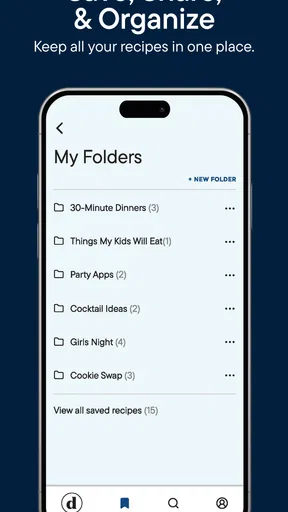
- Saving and organizing favorite recipes may feel limited for frequent users.
Other Releases by Hearst Communications, Inc.
View All
Food Network Magazine US
Food & Drink3.9
Similar Picks in This Category
View All
Rappi: Food Delivery, Grocery
Rappi, Inc - Delivery3.5

McDonald’s: Cupons e Delivery
Arcos Dorados4.3

Swiggy: Food Instamart Dineout
Swiggy4.7

Blinkit: Groceries & more
Blinkit4.8

foodpanda: food & groceries
Foodpanda GmbH a subsidiary of Delivery Hero SE4.0

Zomato: Food Delivery & Dining
Zomato4.7
Frequently Asked Questions
What is Delish, and what can I use the app for?
Delish is a food and recipe app designed to help you discover cooking inspiration, browse recipes, and find ideas for everyday meals, desserts, snacks, and special occasions. Recipes generally include ingredient lists, preparation instructions, photographs, and useful cooking guidance. It can be helpful whether you are planning a weekly menu, looking for a quick dinner, or simply exploring new flavors and techniques.
Does Delish provide recipes for different dietary needs and cooking preferences?
The app includes a broad selection of recipes covering different cuisines, meal types, and preparation styles, with options that may suit preferences such as quick meals, vegetarian cooking, lighter dishes, or family-friendly food. However, users should always read the complete ingredient list and recipe notes carefully. Dietary labels and nutrition information may vary, so people with allergies or strict medical dietary requirements should verify every ingredient independently.
Is Delish free to download and use?
Delish may be available to download at no initial cost, but some content or features can depend on the version of the app, your region, or an optional subscription. Premium access may provide additional recipes, exclusive content, or a more complete browsing experience. Before subscribing, check the current pricing, billing frequency, trial conditions, and cancellation policy shown in the app store or during sign-up.
Can I use Delish without an internet connection?
The app is primarily designed for browsing content online, so an internet connection may be needed to load recipes, images, videos, updates, and other features. Some recipes or content may be available for saving or viewing later, depending on the app version and account functionality. If you plan to cook somewhere with poor connectivity, open the recipe beforehand and save or note the important instructions.
Is Delish suitable for beginner cooks?
Delish can be useful for beginners because many recipes present ingredients, cooking steps, photographs, and practical suggestions in an accessible format. Nevertheless, difficulty varies considerably between recipes. New cooks should begin with recipes marked as simple or quick, prepare all ingredients before starting, and pay close attention to cooking times, temperatures, and food-safety instructions. Recipe results can also depend on equipment and ingredient substitutions.
